Online advertising is key to making your brand and business stand out. The Google Display Network (GDN) – sometimes called Google Ads Display Network – allows you to reach customers with visual ads across millions of websites, apps, and Google properties. With the GDN, you can showcase your brand with images, videos or interactive rich-media, connecting with users as they browse their favorite sites. In fact, Google’s Display Network spans 35 million websites and apps worldwide and reaches roughly 90% of Internet users. This enormous scale makes it a powerful platform for raising brand awareness and recall.
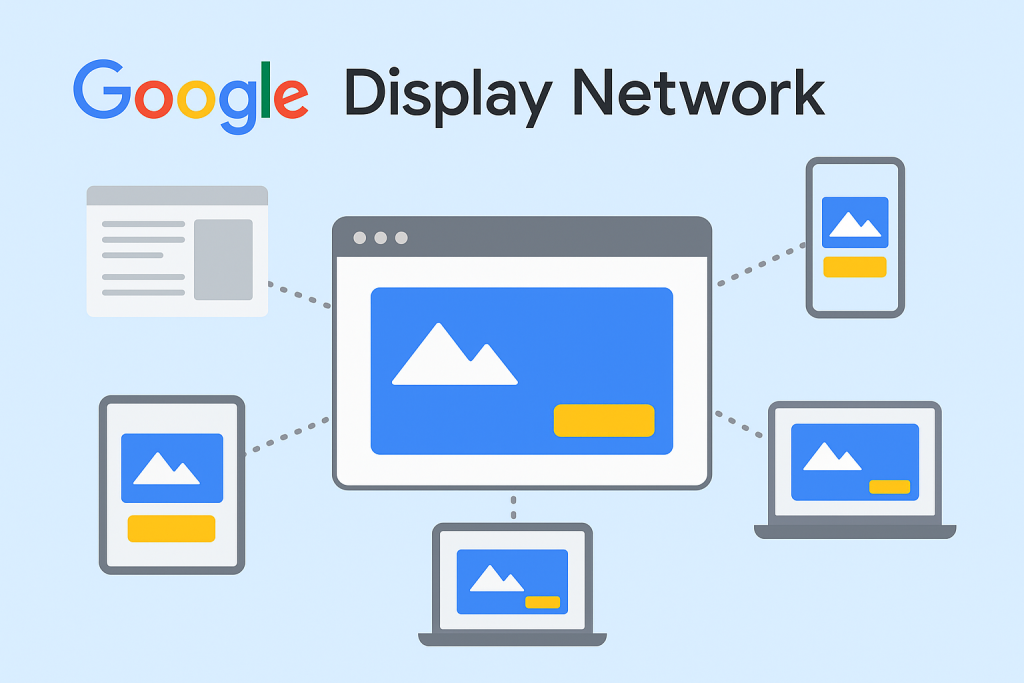
Illustration: Google Display Ads appear on a wide range of websites and apps across devices. The Display Network lets you place visual ads (images, video, animation) that capture user attention on desktop and mobile. The GDN includes everything from news and hobby sites to blogs and YouTube. Unlike search ads that respond to an active query, display ads proactively introduce your products or services through eye-catching visuals and storytelling. This makes display campaigns especially effective for building brand engagement: customers can see your ads and interact with them (for example, by watching a video or clicking to learn more), even before they’re ready to buy.
Why Google Display Ads Help Build Your Brand
The Google Display Network offers several advantages for brand-building campaigns:
Massive Reach: Display campaigns can massively expand your audience. Google reports that Display Ads can reach people across 35 million websites and apps worldwide, including Gmail and YouTube. By appearing on nearly every popular site, your brand gets consistent exposure. Over time, this repeated visibility builds familiarity and trust: studies show that even if users don’t click your ad, the impression itself strengthens brand awareness. In practice, GDN’s global reach means your message can appear to 90% of Internet users.
Precise Targeting: Unlike untargeted banner ads of the past, modern display advertising lets you zero in on the right audience. You can target users by interest (affinity audiences or custom affinity), intent (in-market audiences), demographics (age, gender, parental status), topics, or even specific websites (placements). For example, a sports apparel brand might target “sports fans” affinity groups or show its ads on fitness blogs. Google’s AI also offers optimized targeting, automatically finding new relevant audience segments based on your campaign signals. The ability to combine these options lets you reach new prospects who are most likely to care about your brand.
Engaging Ad Formats: Display ads support rich media – high-quality images, animations (HTML5), and video. This visual impact is ideal for storytelling. A well-designed banner or video can convey your brand’s personality far better than plain text. Google recommends using responsive display ads, which adapt your supplied images, headlines, and logos to fit thousands of ad sizes. You can upload multiple assets and let Google optimize which combinations perform best. For example, you might upload landscape, square, and vertical images; the system will then display the optimal size and aspect ratio for each publisher’s page.
Brand Recall and Remarketing: Even users who don’t immediately click are registering your brand. Over time, seeing your visual ads can increase brand recall. Plus, Google’s Display Network excels at remarketing: re-showing ads to people who’ve already visited your site or app. Remarketing reminds interested users about your products (for instance, displaying a discount code for a cart they abandoned). In fact, data shows remarketing campaigns can boost conversion rates significantly (one study saw up to a 161% lift). In brand building, remarketing ensures that once someone has heard of you, your brand stays top-of-mind as they browse the web.
Flexible Budgeting and Measurable ROI: Display ads use a pay-per-click (CPC) or pay-per-impression (CPM) model. You can set daily budgets that fit any size business, and you only pay when people see or click your ads. For a brand campaign, CPM bidding (pay per 1,000 impressions) is often effective, since you’re paying for exposure. At the same time, Google’s robust analytics let you track performance in real-time – you can see how many people saw your ads (impressions), how often (frequency), and how many took action (clicks, conversions). By analyzing these metrics, you can refine your campaign to maximize brand lift and engagement.
Together, these benefits make the Google Display Network a powerful tool to raise brand awareness, attract potential customers, and ultimately strengthen your brand’s market presence.
Setting Up a Display Campaign for Brand Awareness
Launching a successful display campaign involves clear goals and strategic planning. Follow these steps to ensure your brand campaign is effective:
Define Your Campaign Objective: In Google Ads, choose a Brand awareness & reach campaign. This goal is designed to maximize visibility. When setting up the campaign, consider choosing a CPM (cost-per-thousand impressions) bidding strategy. CPM lets you pay for views of your ad, which is ideal when you want as many people as possible to see your branding message. You can also use automated bidding (Smart Bidding) to optimize for impression share if your goal is top-of-mind awareness.
Select Your Target Audience and Placements: Use Google’s targeting tools to reach the most relevant viewers:
Audience Targeting: Define who sees your ads by selecting relevant audiences. For example, use Affinity Audiences (e.g. “foodies” or “travel buffs”) or In-Market Audiences (people actively researching products like yours). You can even create Custom Audiences with specific interests or keywords. These options help your ads show to users most likely to care about your brand.
Demographic Targeting: Narrow by age, gender, or parental status to match your customer profile. For example, a college sports brand might target the 18–34 age group. If desired, you can exclude demographics that aren’t your market, conserving budget for your core audience.
Placement Targeting: Hand-pick websites or app categories where your ads should appear. For branding, this can be effective. For instance, a home décor brand might run ads on interior design blogs or Pinterest-like sites. You can filter placements by topic to match your product’s theme.
Contextual Targeting: Let Google automatically place ads on sites whose content matches your keywords or themes. For example, an eco-friendly brand might target pages about sustainable living. This ensures contextual relevance and catches users who have signaled interest in related content.
Ad Formats and Creatives: Decide on the types of display ads to run. Google Display supports static banners, responsive display ads, and video ads. For brand campaigns, rich media can be especially memorable. Use Responsive Display Ads as Google’s default – upload multiple images, headlines, and logos and Google will automatically assemble the best ad formats. You can also consider engaging formats like HTML5 animations or short videos. Just ensure all visuals follow Google’s specs (we’ll cover guidelines below).
Budget and Schedule: Set a daily budget that reflects your campaign’s importance and time frame. Brand campaigns often run continuously or in bursts (like around a product launch). You might increase spend during peak seasons or events. Monitor spend to stay within budget while maximizing reach.
Campaign Settings: Enable all eligible Google Display inventory to maximize reach (include Gmail ads, YouTube, and partner sites). Also consider enabling Optimized targeting, which allows Google’s AI to find new audiences likely to convert based on your settings. If you have any specific exclusions (e.g. blocking sites that clash with your brand image), set those up to keep your ads in brand-safe environments.
By carefully defining your audience and using Google’s advanced targeting and bidding, your display campaign will serve ads to the right people at the right time. This strategic approach lays the groundwork for boosting your brand’s visibility online.
Creating Compelling Display Ads
The creative aspect of your ads – the images, text, and overall design – is where your brand really comes to life. Follow these best practices to make sure your ads look professional and resonate with viewers:
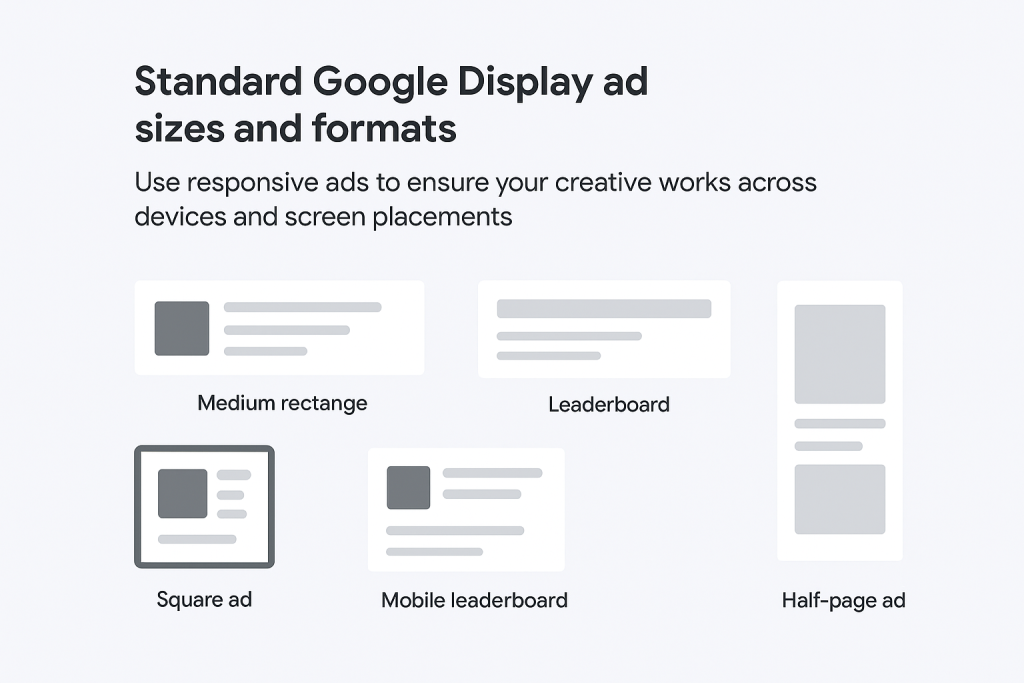
Illustration: Standard Google Display ad sizes and formats. Use responsive ads to ensure your creative works across devices and screen placements. Provide Google with multiple assets (headlines, descriptions, images, logos) so it can assemble the optimal ad variation for each placement.*
Use Responsive Display Ads: Google recommends responsive ads as the default format. In these ads, you supply multiple headlines, descriptions, logos, and images; Google automatically tests combinations to find what works best. This means you only need to upload assets once, and Google resizes and formats them to fit almost any ad slot across the network. Responsive ads are easier to create (you don’t need to design every dimension manually) and tend to perform well because they leverage Google’s AI to optimize for each viewer.
Provide Diverse High-Quality Assets: To maximize the effectiveness of your responsive ads, supply a variety of creative elements. For images, upload at least one in each required aspect ratio (landscape, square, and portrait). Use high-resolution, clear photos – blurry or pixelated images will hurt your campaign. For products, use on-white or lifestyle shots that show the item clearly. Remember Google’s specs: each image must have at least 600×314 resolution (for landscape) or 300×300 for square. Logos should be provided in recommended sizes (for example, 1200×1200 for square logo and 1200×300 for banner logo). Avoid overlaying text or logos on the image itself, as this can violate Google’s image policies.
Craft Clear, Benefit-Driven Copy: Your headlines and descriptions should quickly convey what your brand offers. Use simple, descriptive language that highlights key benefits. For example, “Energy-Efficient Smart TVs for Any Budget” or “Organic Skincare Proven to Rejuvenate Skin.” Since headlines are short (up to 30 characters), focus on value or unique selling points. Descriptions (up to 90 characters) can expand with details like promotions, guarantees, or social proof. Whenever possible, include promotions or calls-to-action (e.g. “Free Shipping,” “Shop Sale Now”) that encourage engagement. Always keep your tone consistent with your brand voice.
Test Multiple Ad Variations: Within each ad group, create 3–4 variations of your display ads. These variations should test different visuals and messaging angles: perhaps one uses a product close-up, another shows the product in use, another highlights a lifestyle scene, etc. On the copy side, you might test a straightforward feature-based headline versus a question or a limited-time offer. Google will automatically show the better-performing versions more often, giving you data on what resonates. This A/B testing approach maximizes your chances of finding a winning creative combination.
Maintain Brand Consistency: Ensure your ads clearly reflect your brand’s identity. Always include your logo, use brand colors or fonts, and carry the same style and messaging. Importantly, the ad’s promise should match the landing page experience. If your ad advertises a 20% discount, the landing page must feature that exact offer prominently. A seamless visual and message flow keeps users engaged. In practice, this means designing your ad and landing page in tandem: when a user clicks through, they should immediately recognize your brand (same logo, colors, etc.) and find the relevant content or product.
Use Engaging Formats When Appropriate: Consider adding motion or interactivity to stand out. Google’s advanced responsive ad features include “auto-generated videos” that turn your images and text into short animations, or “asset enhancements” like focal point highlighting. These can make your ads more eye-catching on the GDN. Just be sure any dynamic elements align with your brand (e.g. no overly gimmicky effects) and comply with Google’s format requirements (file sizes, safe frame, etc.).
By investing effort into your ad creative, you make a strong impression on viewers. High-quality, relevant ads not only attract clicks but also project a professional brand image. This creative quality, combined with strategic placement, greatly enhances brand perception and recall.
Measuring and Optimizing Campaign Performance
Even the best campaign needs tuning. Use data to continually improve your display ads:
Key Metrics: For branding campaigns, impressions and reach are primary indicators. Track how many times your ad is shown and how many unique users saw it. A high reach with multiple impressions per user increases the chance your brand will stick in memory. For deeper insight, monitor frequency (how often the average user sees your ad): too low and your ad might be forgotten; too high and it may become annoying. Another useful metric is view-through conversions (when a user saw your display ad but clicked through later) – this captures indirect impact.
Click-through and Engagement: Display campaigns typically have lower CTRs than search campaigns, so don’t judge success solely on clicks. Still, keep an eye on CTR to gauge engagement. If certain ads or placements have much higher or lower CTRs, that’s valuable feedback. Also track on-site actions that align with brand goals, such as newsletter sign-ups, social media follows, or product video views (if those are important to your brand lift).
Campaign Optimization: Use the reporting in Google Ads to compare performance by targeting type, site placement, device, or demographic. For example, if ads on certain websites or to a certain age group are driving more interactions, shift budget to those segments. If some ads have clearly lower engagement, pause them and try new creative. Always ensure you have conversion tracking set up: this allows Smart Bidding to optimize for results (even brand-loyalty metrics like sign-ups).
A/B Testing: Continue running new creative variations over time. Even beyond your initial set, periodically refresh images and copy to combat “ad fatigue.” Test different calls-to-action or value propositions as your business evolves (for example, during seasonal campaigns). Google’s reports will tell you which assets perform best.
Brand Lift Studies: If your budget allows, consider running a brand lift study (via Google) to measure metrics like ad recall or favorability among your audience. This involves surveying users who saw your ads versus those who didn’t. While more advanced, this data can prove the value of your display spend in concrete brand terms.
By closely monitoring these metrics and adjusting accordingly, you ensure that your display campaign stays efficient and continues to elevate your brand presence. Remember: advertising is a cycle of learning and refining.
AdSense and Google Ads Policies: Compliance is Key
Any successful campaign must respect Google’s advertising and content policies. This ensures a positive experience for users and keeps your account in good standing. Key guidelines include:
Prohibited Content: Google Ads (and AdSense) forbid content that is illegal, promotes illicit activity, or is unsafe. This covers things like counterfeit goods, weapons, or illicit drugs. Make sure your ads and landing pages steer clear of such categories. For example, you cannot advertise a product with a fake brand logo or make health claims that aren’t verified. Both your ad copy and your website must comply.
Quality and Editorial Standards: Ads must be clear, professional-looking, and relevant to the user. Google’s editorial policy disallows gimmicky text (like “FREEEE!!!”) or misleading claims. Always write honest ad copy and use real images that accurately represent the product or service. Similarly, your landing page should deliver on the ad’s promise: it must be fully functional, easy to navigate, and match the ad content. For instance, if your ad says “Shop Summer Collection,” the landing page should clearly offer that collection.
Trademark Respect: If your campaign targets specific brands or includes named products, be careful with trademarks. Google’s policy protects trademark holders, especially against confusing or deceptive use. You are generally free to use trademarks within your ad text if you’re, say, reselling or referring to that product (this is often allowed), but you must not advertise directly as a direct competitor using that trademark in a way that misleads users. For example, do not claim false affiliation with a brand. If you target competitor keywords, ensure your ad itself does not misuse the competitor’s trademark. When in doubt, consult Google’s trademark policy or legal advice.
AdSense Program Policies: If your site shows Google ads through AdSense (e.g. you run a blog or news site along with promoting your brand), follow the AdSense content rules. This means your content should not be illegal, adult, violent, or hateful. Even if you’re primarily an advertiser, any monetized content must comply. Ensuring clean, high-quality content around your ads not only follows policy but also fosters a better user experience and brand image.
Privacy and Data Use: Respect user privacy. Do not collect sensitive personal data through your ads or landing pages without clear consent. Comply with regulations like GDPR (in the EU) or CCPA (in California) when using remarketing lists or collecting user emails. Transparent data practices are both legally required and ethically important. Always disclose your privacy policy and allow users to opt out of tracking where applicable.
Honesty and Ethics: Beyond rules, practice honest marketing. Don’t use false scarcity, fake reviews, or any trickery to lure clicks. Transparency builds trust; for example, clearly label sponsored content and use straightforward promises. Research shows consumers value ethical, authentic advertising. Take inspiration from brands that earned trust through integrity – they often share clear information and meaningful values in their ads. Misleading or manipulative tactics might offer short-term gains but can damage your brand’s reputation in the long run.
In summary, compliance is non-negotiable. Violating Google’s ad policies can result in disapproved ads or even account suspension. It’s wise to review Google’s Advertising Policies regularly. Adhering to these guidelines not only keeps your account safe, but it also ensures your brand is associated with a positive, trustworthy user experience.
Conclusion
Boosting your brand through Google’s advertising platforms requires strategic planning, creative excellence, and strict adherence to best practices. By leveraging the Google Display Network’s vast reach and targeting tools, you can put your brand in front of the right audience with compelling visual ads. Remember to design high-quality, on-brand creatives and continuously test different approaches. Use Google’s analytics to measure impressions, engagement, and conversions – and refine your campaigns over time. Always follow Google’s policies and ethical standards: honest, helpful ads not only comply with rules but also earn customer trust.
For marketers and business owners, Google Display Ads offer a flexible, measurable way to grow brand awareness across all types of industries. With thoughtful setup and ongoing optimization, your display campaigns can connect with new customers, reinforce your brand message, and drive long-term growth. Start experimenting today, keep learning from the data, and watch your brand’s visibility soar on the Google Display Network.






Be First to Comment