RemNote is a knowledge management tool designed to combine note-taking and spaced-repetition flashcards in a single app. Its slogan is “Make flashcards in your notes. Cut study time in half.”. In practice, this means you can type out your lecture notes or reading summaries and instantly turn them into flashcards for review. It uses evidence-based memory science (spaced repetition) to resurface cards at the optimal time for retention. According to Rem Note’s homepage, over “1,000,000+ students” already use it to “add an extra day to their weekend”, reflecting its popularity among learners. Its integrated approach lets students, professionals, and educators work with a single knowledge base, avoiding the need to switch between separate apps for notes, flashcards, and documents.
How RemNote Works
It organizes information using a unique Concept-Descriptor Framework. In this model, most content is broken into Concepts (main ideas or things) and Descriptors (properties, examples, or questions about those concepts). For example, in a biology note one might create the concept “Shingles” (a disease) and its descriptors “symptoms of Shingles” or “relation to Chickenpox”. Concepts are typically written in bold and Descriptors in italics, echoing natural thinking patterns. This hierarchical outline lets you see how big ideas decompose into parts, and it automatically generates flashcards from these connections. In fact, RemNote was built by Anki users who wanted a more logical, brain-like structure for knowledge: instead of only question-answer cards, It lets you interlink ideas across topics as they truly relate.
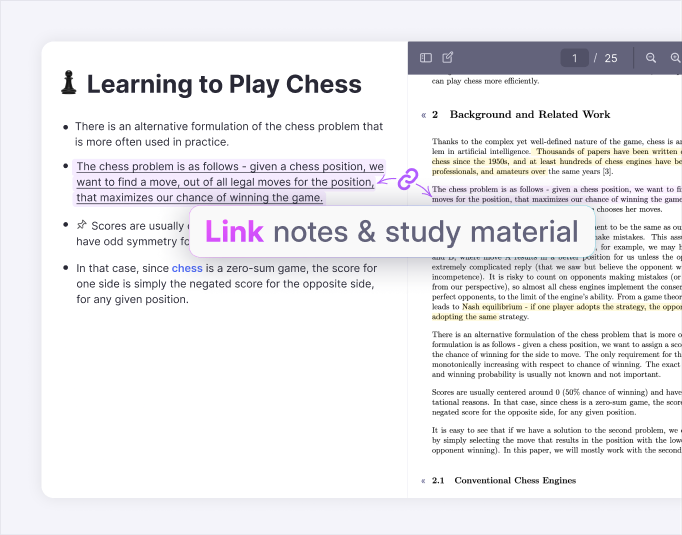
All your notes and cards live in one knowledge base. You can link any two ideas by creating a Rem Reference, which functions like a two-way link or backlink. For example, if you mention “rash on one side of the body” in your notes about Shingles, you can link that phrase to the “Shingles” concept. Later, when reviewing the card, you’ll see that connection. This bidirectional linking means your knowledge forms a connected graph – similar to a mind map – where studying one concept will surface related ones. In practice, it shows the number of links to each concept (e.g. “2 links, 4 PDFs”) and lets you jump between notes seamlessly.
To help you remember what you study, it uses spaced repetition scheduling. Behind the scenes it offers two algorithms: the classic Anki SM-2 and a newer FSRS model. Both are designed to keep your “retrievability” (chance of recall) around a target (often ~90%) by timing reviews. You can also tell RemNote when you have an exam coming up – its built-in exam scheduler will automatically intensify your review right before the test. In other words, it learns your schedule: it adds extra practice on approaching exam dates so you walk into the test “knowing memory won’t be a problem”. (Indeed, it reports that 89% of students feel less exam stress using it.)
Key Features
It packs many study tools into one app. Here are some highlights:
- Flashcards within Notes: Just type == (or use the toolbar) after any line to convert it into a flashcard. You can create standard Q&A cards, cloze deletions, image occlusions, or multi-part “two-way” cards. All flashcards live right beside your notes, so there’s no context-switching.
- PDF & Document Annotation: You can upload PDFs, PowerPoints, or other documents and tie them into your notes. When you open a PDF in Rem Note, you can highlight text and create links or flashcards directly from the source. This makes studying slides or papers effortless.
- Tables and Databases: It supports tables and simple databases for organizing information. You might use these to track deadlines, to-do lists, reading logs, or study schedules. Unlike plain text tables, it tables can even create flashcards from cells, or let you filter and sort data as part of your learning workflow.
- Image Occlusion Flashcards: For visual subjects (e.g. anatomy, geography, diagrams), it offers image occlusion cards. You upload an image and mask out parts (like labeling regions on a map or steps in a process). RemNote.com then generates flashcards that quiz you on the hidden parts. This helps you “master visual content” by actively recalling what you covered up.
- Rich Content Embedding: You can embed media like videos, audio clips, and LaTeX equations directly in notes. For example, math students can write formulas in LaTeX, and you can drag-and-drop images or videos into your knowledge base. The app even supports drawing mode for sketches.
- AI-Powered Study Tools: New features leverage AI to speed up learning. RemNote’s AI Flashcard Generator can turn any pasted text into a set of flashcards automatically. It uses a large language model (by default Claude Sonnet 3.5) to create questions and answers. You can preview the suggested cards, uncheck any you don’t like, and save them to your notes. It also plans AI summaries and quizzes for documents. (Note: the help docs recommend treating auto-generated flashcards as a starting point and refining them for best results.)
- Offline & Cross-Platform: It works on all major platforms (Windows, Mac, Linux, iOS, Android, web). The desktop and mobile apps let you study offline. Edits sync automatically when you reconnect. You can also use a local-only knowledge base on desktop for full data control, and it does daily local backups of your data. This ensures you own all your notes and flashcards, even without internet.
- Collaboration and Community: It lets you share your notes and flashcards. There is a community library where students upload sets (e.g. MCAT, USMLE, languages) that anyone can copy. Educators can publish course notes, and learners can access thousands of study guides. (Always use shared content ethically: RemNote’s goal is cooperative learning, not cheating.)
- Analytics: It provides detailed statistics on your learning. You can see how many cards you’ve reviewed, your retention rate, and even insights about which concepts are hardest. These help you adjust your study plan.
Benefits of RemNote
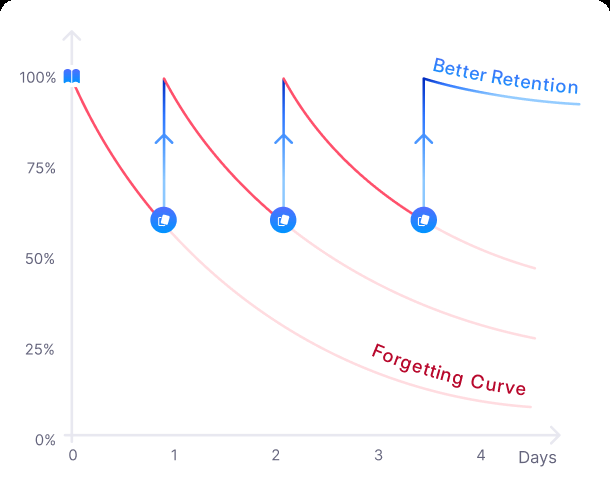
Improved Retention. By combining notes with spaced repetition, it helps you remember information with much less effort. Educational research shows that spaced review beats simple rereading every time. The company’s site emphasizes this: “Flashcards shown at intelligently-timed intervals (spaced repetition) outperform all other learning techniques”. The chart below illustrates why: without spaced review (red curve), recall drops quickly; with RemNote’s spaced schedule (blue curve), knowledge stays near 100%.
Time Savings. Users report that RemNote cuts study time in half by focusing review efficiently. Instead of re-reading whole chapters, you practice only what you’re about to forget. One testimonial notes that after switching to RemNote, a student achieved top marks with half as much effort. The automatic scheduling and rapid flashcard creation (e.g. typing == creates a card in under half a second) mean you spend more time learning and less time organizing.
Less Stress. Because it’s algorithms keep you up-to-date, many students feel calmer during exams. The site highlights that 89% of students experience less exam stress using it. Walking into a test knowing the material has been fully reinforced can make a big difference.
Organized Understanding. The concept-descriptor framework and bidirectional links make your notes mind-map-like. You can craft a hierarchical outline of a class, see connections between topics, and always refer back to source materials (even PDFs). This big-picture structure helps make classes “click” – you see how each fact fits into a larger web of understanding. In essence, it turns passive notes into an interactive knowledge graph.
Exam Prep and Active Recall. It’s exam scheduler is a standout feature. You simply enter an exam date, and it ensures you cover all cards in time. As a result, you continually test yourself on future exam material, rather than cramming. Students can focus on understanding, knowing RemNote’s schedule handles the timing. The app even includes “Daily Documents” for planning study sessions and reflecting on progress, which helps build good study habits.
Comparing RemNote with Other Tools
- Anki: A dedicated flashcard app. Anki is powerful for spaced repetition, but it has a steep learning curve and lacks integrated note-taking. RemNote’s advantage is that it streamlines card creation by letting you generate flashcards directly from your notes. In fact, it was born from Anki users wanting a more structured workflow. Unlike Anki’s flat deck system, it lets you hierarchically organize concepts and link them in rich ways.
- Quizlet: A user-friendly flashcard website/app. Quizlet is good for simple memorization but doesn’t use smart scheduling (it mostly uses review games). RemNote’s built-in spacing algorithms (SM-2, FSRS) give a stronger science-based memory boost. Quizlet’s interface is simpler, but it covers that and much more (custom card types, notes, equations, etc.).
- Notion/Evernote/OneNote: These are general-purpose note-taking apps. They let you write and organize information (text, tables, embedded media) but do not include flashcard or SRS features. You’d have to use a separate app for review. It replaces those by providing notes and memory tools together. For example, Notion has backlinks and databases, but you can’t schedule reviews automatically. RemNote, by contrast, integrates evidence-based recall right into the editor.
- Obsidian/Roam: These are “second brain” graph note apps (Markdown with backlinks). Obsidian and Roam excel at linking ideas but require third-party plugins or manual work to get flashcards or scheduling. It offers an all-in-one system: its graph-style notes come with built-in flashcards. Moreover, it has official mobile and desktop apps with offline mode, whereas Obsidian and Roam usually rely on syncing your own files.
- Evernote, Google Docs, etc.: Traditional editors. It outdoes plain documents by adding learning features. You can think of RemNote.com as replacing a folder of mixed study apps – notes, textbook PDFs, and flashcards – with one unified workspace.
RemNote’s niche is combining the best of all these: the structure of a wiki or outlining app, with the rigor of a spaced-repetition system and powerful study features.
Tips & Best Practices
- Use the Concept/Descriptor Method: When starting a topic, write the main ideas as Concepts (capitalize/bold them) and break them into Descriptors (italic). For example, “Cell” as a concept and “what organelles does it contain?” as a descriptor. This automatically generates intuitive flashcards. If unsure, just jot down raw notes first – you can convert them into the structured format later.
- Link Your Notes: Make use of Rem References. Whenever a term or idea recurs in different subjects, create a reference link (type [[Concept]]). This builds a network of your knowledge. For example, linking “Computer” to “Internet Browser” helps you see related concepts together. Over time, you can query your KB (e.g. “all cards linked to Disease”) to find patterns.
- Tag and Portal Concepts: You can tag concepts by type or category (e.g. add #Biology or #Disease). This organizes your knowledge and lets you filter. Portals (((concept))) are another feature to import a concept’s content into another note. For example, if you expect to see the concept “Photosynthesis” in many chapters, portal it so you have one central entry.
- Shortcut for Flashcards: Learn the quick keys. Besides == for a basic card, RemNote supports shortcuts for cloze deletions and multiple-ways cards. On mobile, use the “Insert” menu or type >>, <<, <> for two-way cards. These let you experiment with different card formats.
- Use the Exam Scheduler: Always set your exam or quiz dates in the app. This triggers extra reviews in the lead-up so you never end up cramming too late.
- Leverage the AI Tools: When you have large text to study, try the AI Generate Flashcards feature. Paste a passage and let RemNote propose cards. Then edit those cards – AI gets you 80-90% there, but adjust phrasing or details as needed. (The developers recommend treating AI cards as “a starting point” and fine-tuning them yourself.)
- Annotate Everything: Upload your lecture slides, PDFs, and images into RemNote. Highlight key points in the document viewer and drag them into your notes to create flashcards. For diagrams, practice with the image-occlusion tool. The closer your notes reflect the source material, the easier it is to review.
- Add Hints: If a flashcard is too hard, add a hint using /hint. This clue will appear on demand when studying. For example, for the question “Newton’s First Law,” a hint might be “hint: relates to inertia.” Use hints sparingly – It warns that relying on them too much can fool you into passive recall. If a card consistently needs a hint, consider rephrasing it or splitting it into smaller pieces.
- Regular Review: Make a daily or weekly study routine. It’s mobile app works offline, so you can review on the go (on a bus or in a café) and it syncs later. Use the “Daily Document” feature to reflect on what you learned each day. Over time, it’s practice queue will adapt to your pace.
Ethical and Practical Considerations
It is a legitimate study tool, but like any tool, it should be used responsibly:
- Data Ownership & Privacy: RemNote.com emphasizes “complete ownership of your data”. Your notes and cards are encrypted in transit and at rest, and you can opt to keep a local knowledge base for extra security. This means you maintain control over sensitive info. (If you’re entering highly personal or confidential material, the desktop app’s local mode is advisable.)
- Academic Integrity: It’s AI and shared content features should be used to aid learning, not to cheat. Do not simply copy published solutions into your notes without processing them. Instead, use RemNote to test your understanding. For instance, AI-generated flashcards should be edited for accuracy and clarity. The It guides explicitly warn not to view hints or answers as crutches – they are meant as training wheels. Always ensure you understand the material, not just memorize answers. Using RemNote.com to organize and reinforce your own learning is ethical; passing off others’ work as your own is not.
- Collaboration Etiquette: If you use shared flashcards or notes from the community, credit the creators and double-check for errors. Educators should remind students that these resources complement teaching – they don’t replace doing original homework and studying from first principles. Transparency about using such tools maintains academic honesty.
Overall, It is designed to support the learning process. Its ethical use boils down to this: let it help you remember and integrate knowledge, but keep the focus on understanding and genuine mastery of your subjects.
Conclusion
It bridges the gap between note-taking, concept mapping, and memorization. Its feature-rich platform – from PDF annotation and custom databases to AI-generated flashcards and offline sync – makes it a versatile study environment. Students gain efficiency (often halving study time) and confidence (“89% less stress” on tests) by following RemNote’s structured approach. Professionals and educators find that they can organize complicated information hierarchically and recall it reliably. By citing correct information and grounding study in evidence-based methods, It’s users build a living knowledge base – one that grows with them through every exam, certification, or project.
Read more about: Importance of Joinpd for learning in 2025











Be First to Comment